A family wall calendar, tested on a Raspberry Pi while I wait for a NUC

@wintaru · Oct 4, 2026 · 4 min read
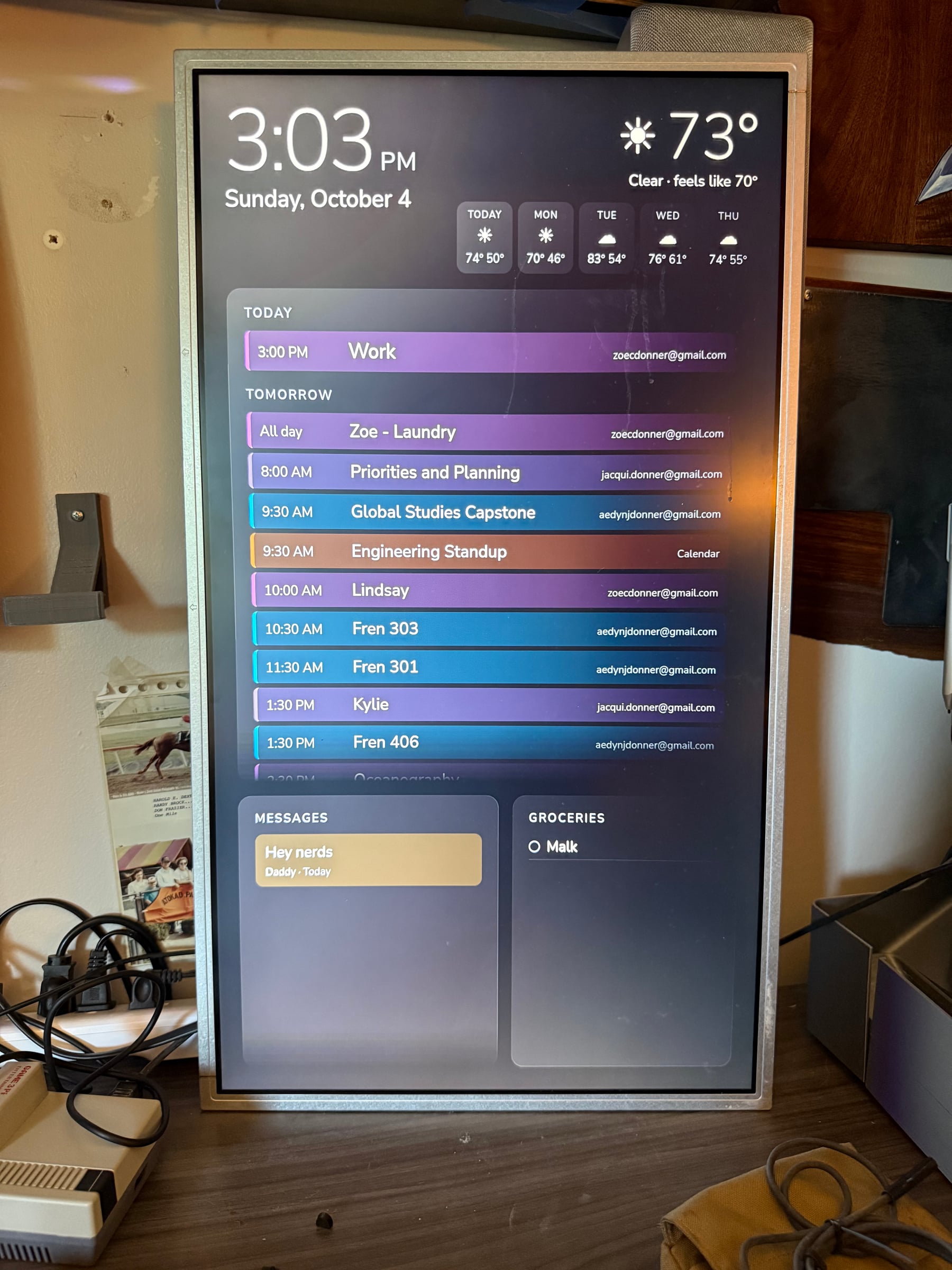
I'm building a family calendar for the wall: a 1080×1920 LCD turned on its side, in a wood frame. The plan is to run it on an Intel NUC. That hasn't arrived yet, so I tested everything on a Raspberry Pi 3 I already had.
What's on the wall
The screen is a web page in Chromium, full screen, and it starts at boot. It shows:
- The clock, the date, and the weather (from Open-Meteo, no API key needed).
- A Google Calendar agenda for the next few days, with every family calendar in its own color. One calendar, our bill due dates, is hidden. The kids don't need to see that.
- Our grocery list from Microsoft To Do. The kids already use To Do, so I didn't want a new list.
- A message board.
- Countdowns. A countdown can repeat, because family game night is every other Thursday.
- A "trash goes out tonight" card on Tuesday evenings for the youngest.
- A black screen from 8pm to 4am.
The phone page
Anyone on our Wi-Fi can open http://calendar.local, save it to the iPhone home screen, and post messages, add countdowns, or add groceries. There's no sign-in. A grocery added there goes into the real To Do list, and checking one off there marks it done in To Do.
Later I added photos. Someone picks a photo on their phone and it shows up on the wall. The phone shrinks the photo before it uploads, so a 4 MB test photo arrived as 157 KB and the Pi never has to resize anything. The wall switches between the calendar (45 seconds) and a photo page (15 seconds). The bottom half of the photo page is a fact of the day.
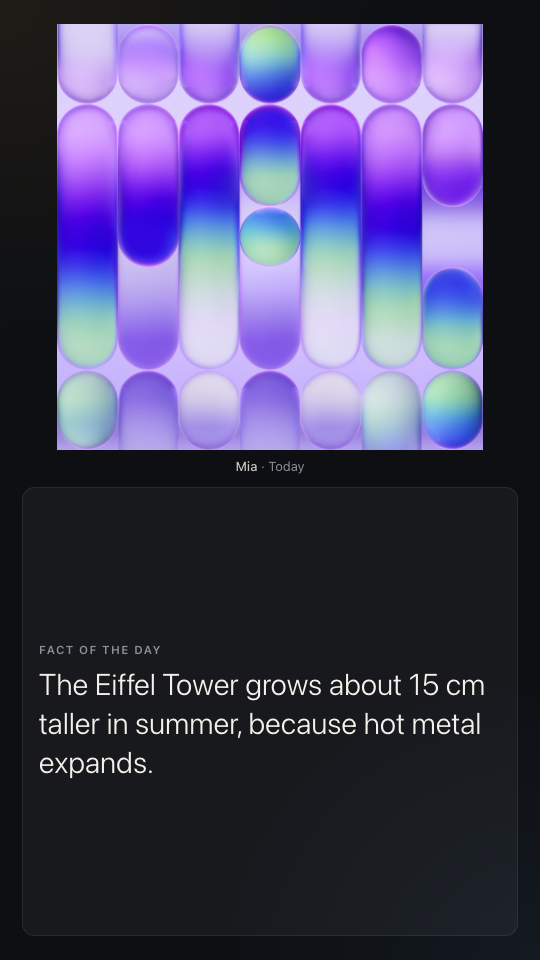
There are also two buttons at the top of the phone page, so we can switch the wall by hand until I wire up a macropad. The picked page stays up for two minutes.

The stack
SvelteKit with TypeScript, on Node 26. Node 26 has Temporal for dates and node:sqlite built in, so the messages, countdowns, photos, and facts all go into one SQLite file with no extra packages.
Things that didn't go to plan
Google Calendar. The normal route is an OAuth app, and Google wanted a review before it would let the app out of testing mode. Instead, a small Google Apps Script runs as me and returns my calendars as JSON. The script sees every calendar shared with me, and the app fetches it every 5 minutes. The script URL works like a password, so it lives in .env.
Microsoft To Do. Even for a personal account, you need an app registration, and that needs a free Azure account first. Then the To Do API answered $select with HTTP 400. On top of that, our list is actually named "🛒Groceries", so the app now ignores emoji when it looks for the list.
The fact of the day. It comes from Claude through the API, one request a day. My first try used Haiku, which is cheap. Its first fact said the body makes 25 million new cells every second. The published estimate is about 4 million. The kids will read the wall as true, so I switched to Opus. Opus thinks before it answers, and the thinking used up my 200-token limit before any text came out, so that limit went up to 2,000. At one request a day it still costs a few cents a month.
Deploys broke the wall. After a deploy, the page already on the screen tried to load code files that the new build had deleted, and it ended up on a plain "500 Internal Error" page that never tries again. Now the page asks the server for its version before each refresh, and it reloads itself when the version changed.
The Pi's limits
The photo page works on the Pi, but a switch from the phone takes several seconds. I measured it, and the push from the phone gets to the Pi's browser in under a second. The rest is the Pi trying to draw the new page with 1 GB of memory while it swaps to the SD card. It also reported under-voltage at some point. That's as far as the Pi goes, so it's on hold until the NUC shows up.
Drafted with an assistant, edited by @wintaru
0 comments