Stand up and be counted: the Daily and Wins tabs

@wintaru · Oct 15, 2026 · 7 min read
Part 4 of a series on my work dashboard.
This one is for anyone who freezes at standup when somebody asks "what did you do yesterday?" Two tabs in my dashboard handle that question and its bigger cousin, "what did you do this year?", at review time. The Daily tab writes yesterday up for me. The Wins tab keeps a running list of the stuff worth bragging about.
Part 1 covers why I built it. The short version: it's a local web page on my laptop that watches my code, GitHub, and my Claude Code sessions, and uses my own Claude subscription to summarize things.
All the screenshots use a made-up company, Acme Robotics, with fake data.
The Daily tab
The idea came to me a day after I started the dashboard. I wanted "a daily synopsis of what I did the previous day, with a way for me to add my own notes." The important part: the AI summary and my notes stay separate, in case I want the summary regenerated.
So each day has two boxes:
- Synopsis — Claude writes a short account of the day. Seven sentences at most, because I read it out loud.
- My notes — mine. Claude never touches them.
They live in the same file on disk but as two separate fields. Hit Rewrite as many times as you like and your notes don't move.
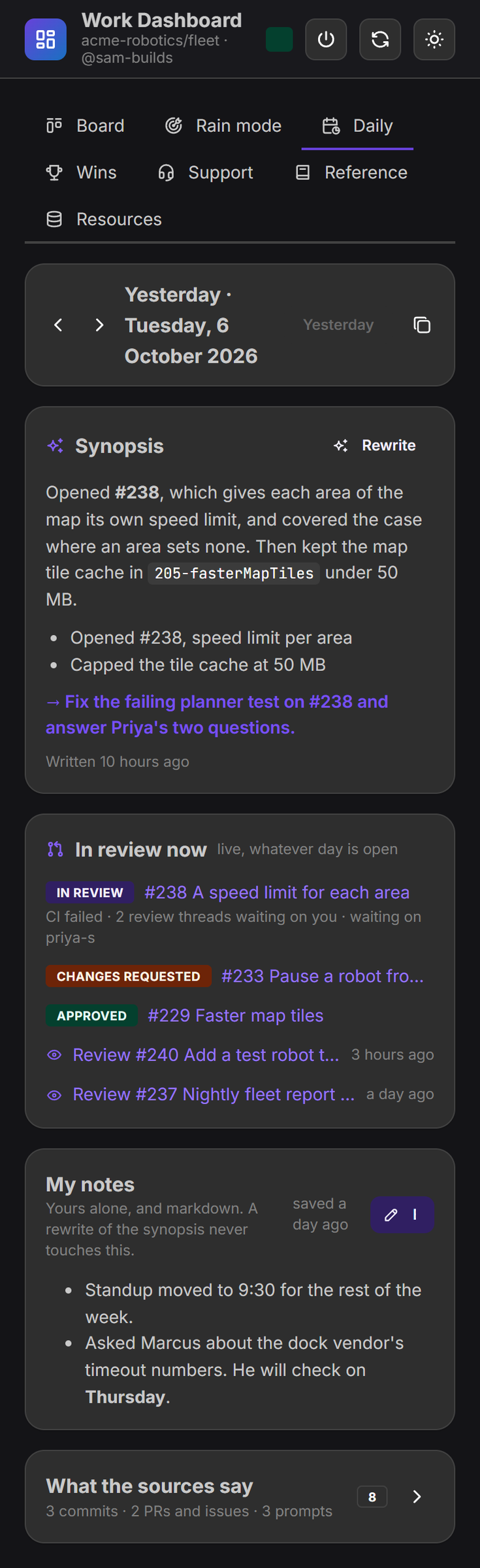 The Daily tab on a phone. Fake data from the made-up Acme Robotics.
Markdown everywhere
At first only my notes supported markdown (the simple formatting where **this** turns bold and a dash starts a bullet). Then the synopsis looked off next to it, with a different font, so I asked for markdown there too, and for Claude to know about it when it writes. Now branch and file names come back as code, the one thing that matters most comes back bold, and links open in a new tab.
What about Monday?
Here's a question I asked on a Friday: when I ask for "yesterday" on a Monday, do I get Friday, or Sunday, which will probably have nothing?
The fix: Friday, Saturday, and Sunday are one entry, saved under Friday's date. On Monday, "yesterday" is Friday plus the weekend. Any weekend work lands in there too. The arrows step over the weekend instead of showing three pages.
Which, honestly, is also how Monday feels.
Where it gets its facts
The synopsis reads four sources for the day:
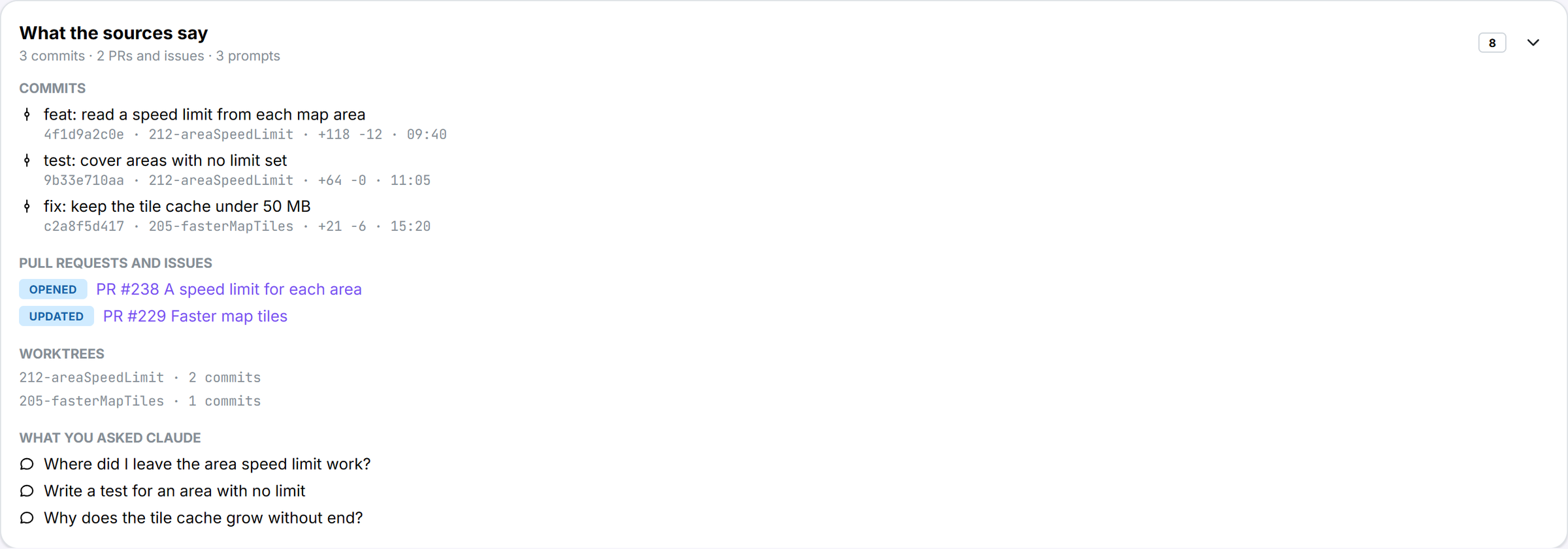
- Commits — every commit in the repo with my email on it, on any branch. A commit still counts after its worktree is gone. (A worktree is a second copy of the code checked out in its own folder, so I can work on two things at once.)
- My Claude prompts — what I asked Claude Code that day. These catch the work that never turned into a commit, like research or a dead end.
- Pull requests and issues — ones that opened, merged, or changed that day. (A pull request is a request to merge my changes into the main code, where teammates review it first.)
- Worktrees — the folders that hold those commits.
Each pull request also comes with its current state: whether it's approved, who hasn't reviewed yet, which review comments still wait on me, and whether the automated tests failed. Claude writes the "next" line from that, so it doesn't tell me to answer feedback I already handled.
If I want to check its work, "What the sources say" opens the raw list.
Out of date, and copy
A synopsis gets marked "out of date" and dimmed when something changed after it was written: a new commit, a pull request that moved or got a new review, a failed test run. It also goes out of date when the instructions Claude writes it from change. Then I press Rewrite.
There's also a copy button. It puts the synopsis, the in-review list, and my notes on the clipboard as markdown, ready to paste.
It writes itself in the morning
I don't even have to press the button. Each morning the dashboard writes yesterday's synopsis by itself, once, if there isn't one yet. On Saturday and Sunday it waits, because the Friday entry isn't finished until Monday.
Getting it on my phone for standup
The Daily tab covered what I did. But at standup I also wanted what's in review right now, and I wanted it on my phone. My laptop runs Windows and my phone is an iPhone, so there's no easy built-in way to pass things between them.
Two pieces fixed it.
First, an In review now card under the synopsis. It lists my pull requests that are waiting on review, with what still holds each one back, plus the ones other people asked me to review. It always shows the state right now, whatever day you're looking at.
Second, Tailscale. Tailscale makes a private network between your own devices (it calls this a tailnet), so my phone can reach my laptop as if they sat on the same desk, without putting anything on the public internet. I already had a tailnet, so it just needed the laptop added. A small PowerShell script now starts the dashboard and turns on the Tailscale sharing together, and it does it again on every restart.
From the phone the dashboard is read-only. I can read every tab, but any button that writes, like Save or Rewrite, gets refused. Some of those buttons run Claude with access to my machine, so they stay on the laptop.
The Wins tab
I just started this job, and I wanted to keep track of my "wins" from the start, not try to remember them all at review time. Since the dashboard already reads my Claude conversations, a tab for that was a short step.
Each win has a date, a title, and details in markdown. I can add, edit, and delete them on the page. The copy button puts the kept ones on the clipboard as markdown, which is exactly the shape a review form wants.
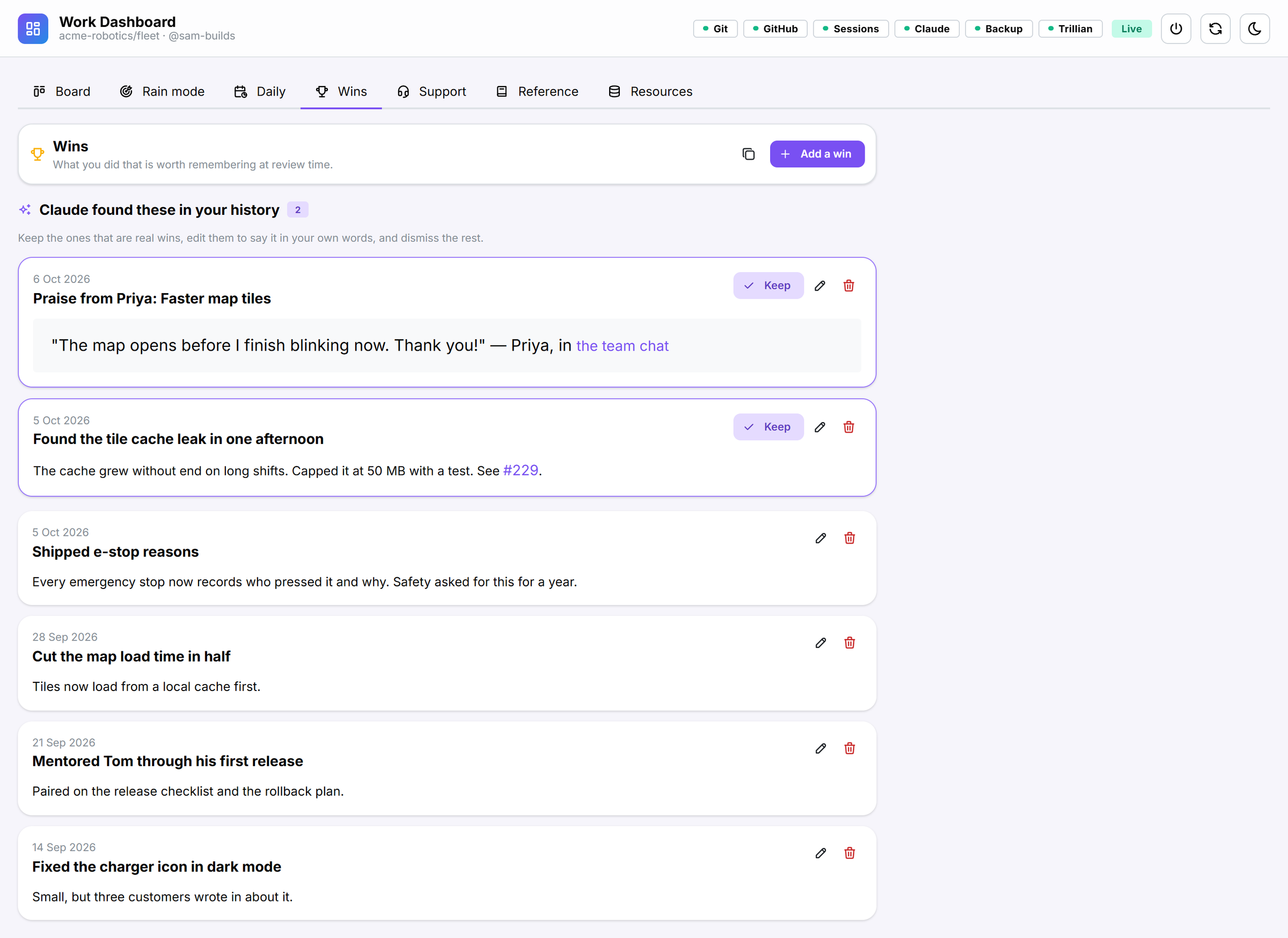 Two suggestions at the top, kept wins below. All fake, all Acme.
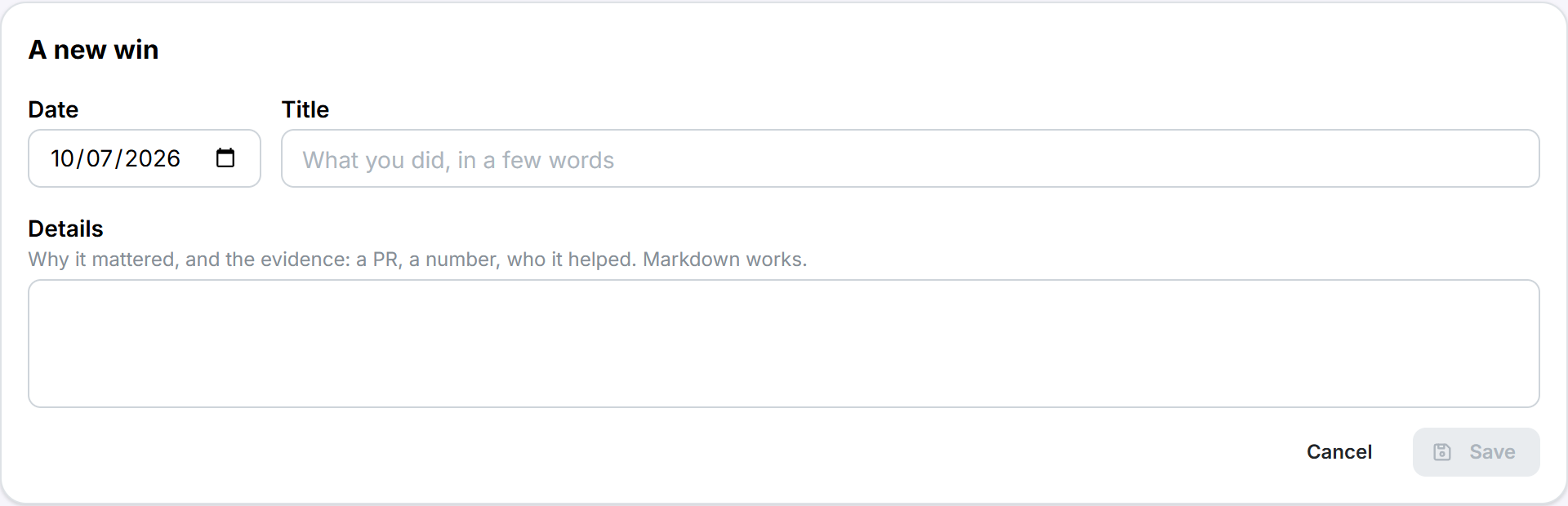
Automatic suggestions
The day after I built it, I asked whether the tab looked for new wins each time I opened it. It didn't, and I wanted something automatic.
Now, each morning, the dashboard goes back over my recent work days, one at a time. For each day, Claude gets the same facts as the daily synopsis, plus my notes and the wins I already have, so it doesn't suggest the same one twice. It gives at most three suggestions for a day, and often none. A suggestion shows at the top with a Keep button. The trash button dismisses it, and a dismissed one doesn't come back.
I'll be honest: I'm still making up my mind about this part. Some suggestions are just summaries of work that got merged. That isn't necessarily bad, but I'm still thinking about it.
Praise from coworkers
A coworker said something nice about my work in Teams, and I thought it would be nice to have comments like that in there too. So before Claude looks at a day, a read-only search goes through Teams for that day: messages sent to me directly or in group chats, and channel posts that use my name. It keeps only messages where someone thanks, praises, or credits my work, and the suggestion quotes them.
The first version missed a compliment I got in a direct message, so direct messages are now the priority.
Since those quotes come from someone else's message, a suggestion shows no images, and only its links into Teams and GitHub work, until I keep it.
A word on the numbers
Here's what the Daily tab is built on, one week at a time: commits on my branches and Claude Code sessions.
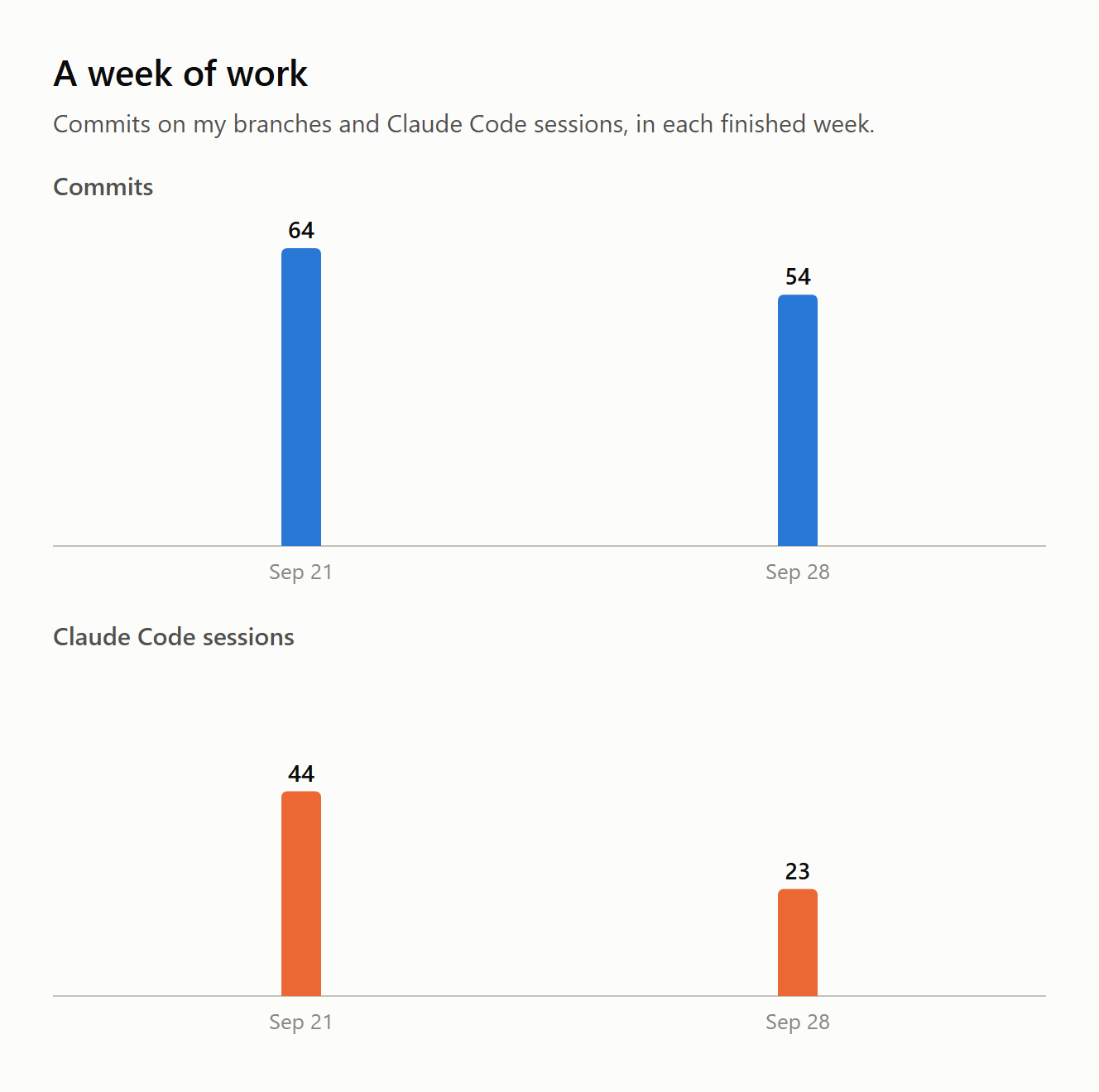 Only two full weeks are shown, because Claude Code deletes its session logs after 30 days. Older weeks would undercount.
Drafted with an assistant, edited by @wintaru
0 comments