Title match: telling a pile of VS Code windows apart

@wintaru · Oct 23, 2026 · 5 min read
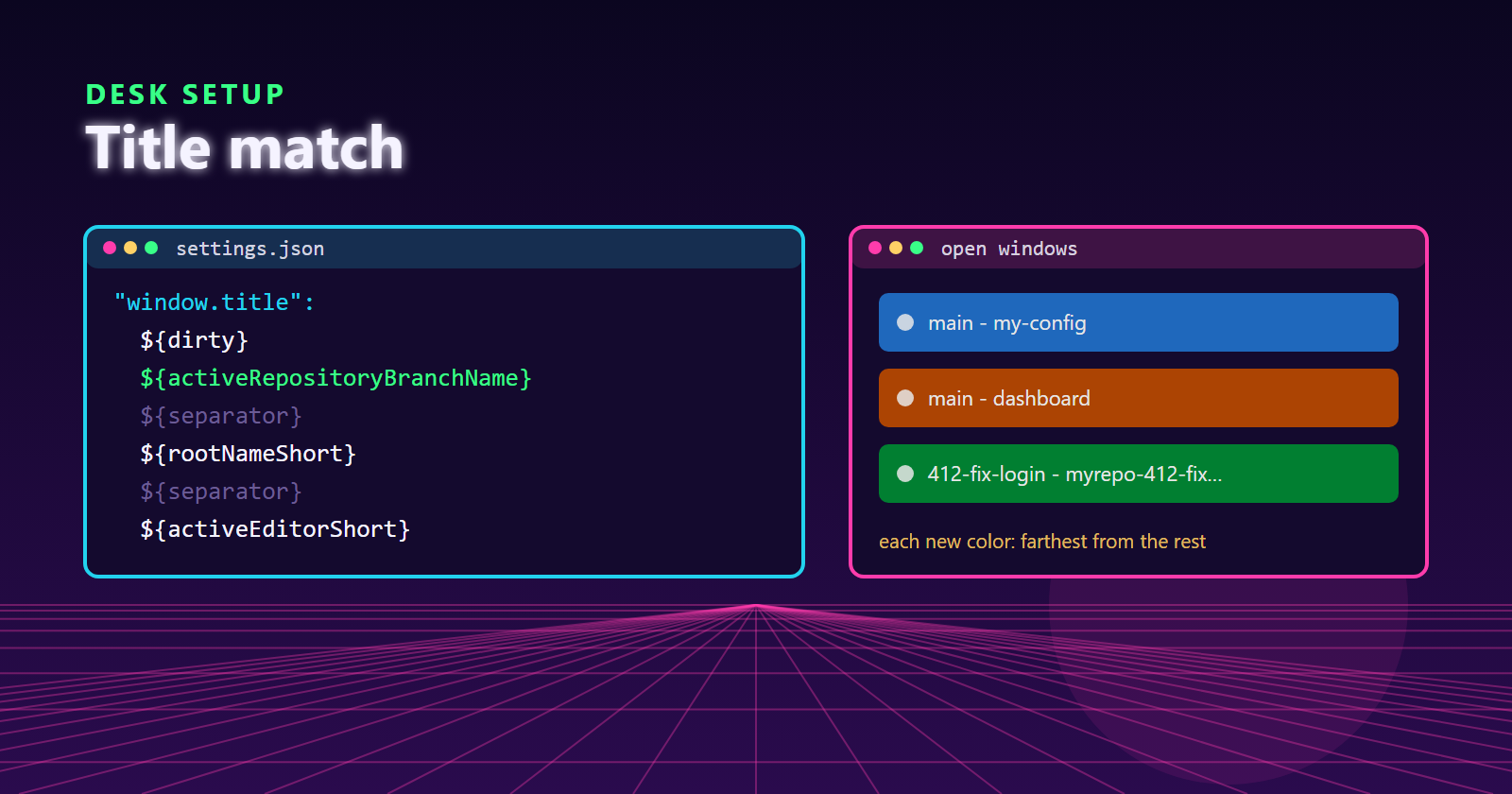
I've had as many as 8 VS Code windows open at once (a few repos, plus a worktree per task at work), and they all looked the same. So I changed two things: the window title now starts with the git branch, and every checkout gets its own title bar color, picked by a little script so no two windows look alike.
The color script is in a gist if you want it: trillian-vscode-color on GitHub. It's plain Python with no extra packages. Run apply in a checkout to give it a color and release to free the color when you're done with it.
(A worktree, if you haven't used one, is a second copy of the same git repo checked out on a different branch in its own folder, so I can work on two things at once without stashing.)
The title
My title used to be just the folder name. The problem is my worktree folders all start with the repo name, something like myrepo-412-fix-login-timeout, and the taskbar and Alt+Tab cut titles off at the end. So every window started with the same word and the part that was actually different got chopped.
The fix is one setting, window.title, set to these pieces all run together in one string:
${dirty}
${activeRepositoryBranchName}
${separator}
${rootNameShort}
${separator}
${activeEditorShort}
That gives me titles like 412-fix-login-timeout - myrepo-412-fix-login-timeout - Login.cs. The branch comes first, so the useful part shows even when the rest gets cut off. ${dirty} puts a dot up front when I have unsaved changes, and ${separator} only shows up between things that exist, so a folder with no git repo doesn't get a dangling dash.
I wasn't sure about the file name on the end at first, it felt like gibberish tacked on and kind of distracted me, but after living with it for a bit it seems fine.
There are way more variables than I knew about (the file's language, the focused view, your profile name, the remote for SSH or WSL). Search for window.title in the settings UI and it lists them all, or see the VS Code docs.
One gotcha: my window layout script matches windows on the part of the title before the first " - ", so I kept the default separator.
The colors
The Peacock extension colors the title bar, activity bar, and status bar per workspace, and it keeps the color in the folder's .vscode/settings.json. So my buddy Claude and I wrote a small script that hands out colors for me. It gives each checkout its own color when I make a new worktree, and cleaning up a worktree frees the color again.

The first version used a fixed list of colors and took the next unused one. That gave my two always-open windows (my config repo and my work dashboard) almost the same blue. Now it picks the color that's as far as possible from every color already handed out, so the first is blue, the next is orange, then green, and so on. "Far" is measured in OKLab, a color space where equal distances actually look equally different to your eye (plain RGB doesn't work that way). New colors come in three brightness levels, all dark enough that the white title text stays readable.
The plan was to only set Peacock's color and let Peacock paint the window. That worked in one window and not the other. Turns out the other window had its settings.json open with unsaved changes, and VS Code won't let an extension write a settings file while it has unsaved edits, so that's probably why the color never changed. Now the script writes the window colors itself, and VS Code picks them up with or without Peacock.
It also keeps that settings file out of git. My work repo already ignores .vscode/, but my personal repos didn't, so it adds the file to git's local exclude list instead of .gitignore (nothing to commit). If a repo actually tracks the file, the script refuses instead of dirtying it.
That held up until I had 19 checkouts on this machine. Every one of them got a color whether its window was open or not, and they were all crammed onto one color wheel, so two of my open windows came out nearly the same green and two more came out nearly the same purple (so much for telling them apart at a glance).
Now the script asks my session tracker (a little script that keeps a list of every Claude session running on my machine) which checkouts have Claude running, which is pretty much the list of windows I have open, and keeps those colors the farthest apart. Checkouts with nothing running still count, just half as much, so a worktree I open again tomorrow doesn't land right on top of another one. The two extra brightness levels give it a lot more room too.
I had 6 windows open when I fixed this. If I ever have more than 8 open at once something has gone very wrong and window colors aren't going to help.
Last changed by an assistant for @wintaru
0 comments