Walk me through it

@wintaru · Oct 11, 2026 · 7 min read
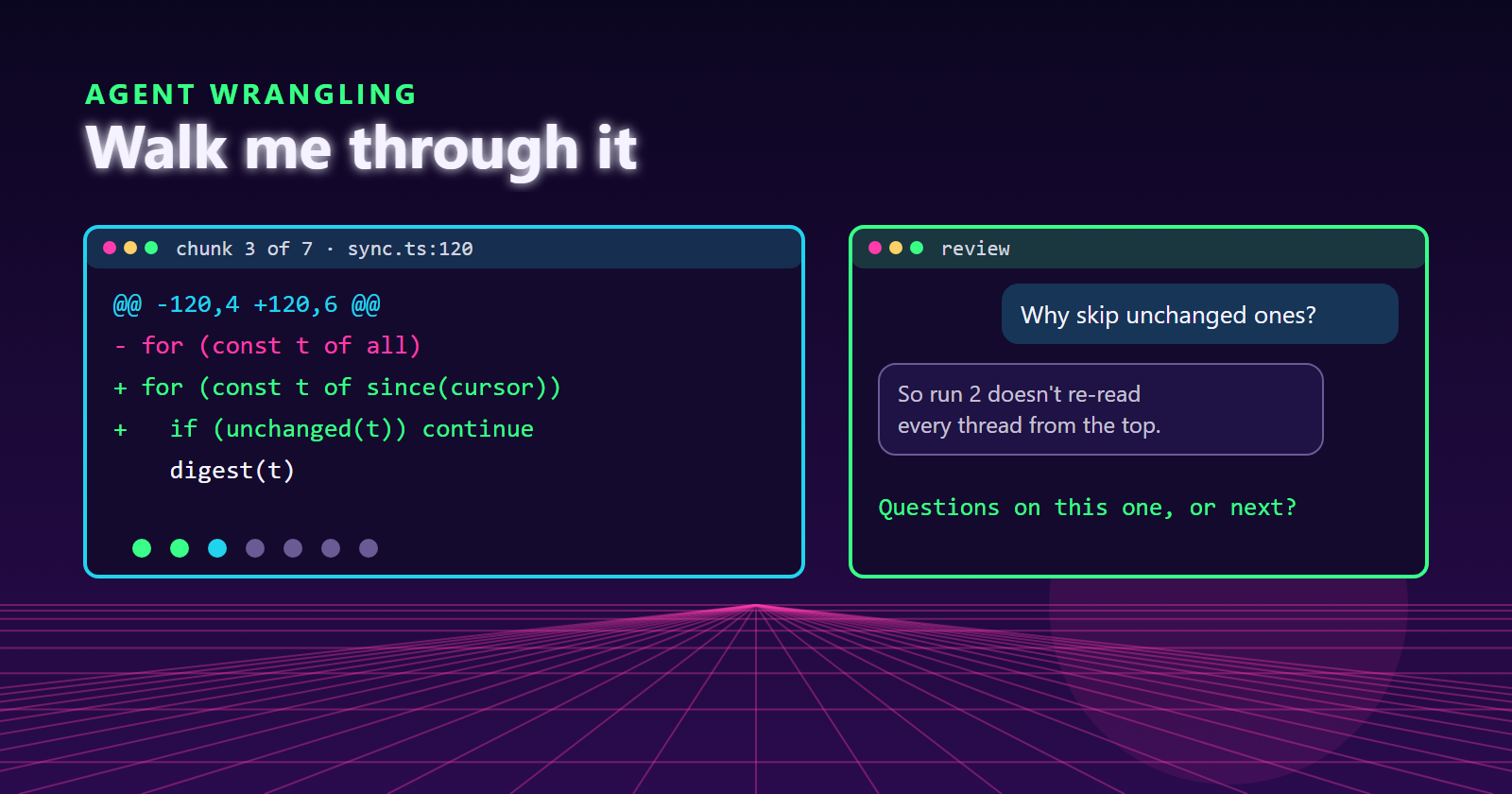
If an AI agent writes code that goes out under your name, you need to understand every line of it, not just the summary at the end. This post is about a new Claude Code skill I made that walks me through a set of changes one piece at a time, the way a coworker would at my desk, and stops after each piece so I can ask questions.
(A skill is a set of instructions Claude Code loads only when it needs them. Mine live in my portable setup, Trillian.)
The problem with summaries
When an agent finishes a chunk of work, it gives you a tidy summary: "Added a column, updated the reader, wrote three tests." I read it, it sounds right, and I nod. Then a reviewer asks about line 140 and I'm reading my own pull request like it's the first time.
The best code reviews I've had weren't summaries. Someone sat next to me, put one piece of the diff on screen (a diff is the list of lines added and removed), explained it, and waited. I asked my dumb questions. Then we moved on. I wanted that, with Claude in the other chair.
How it works
I say "walk me through the changes" or /walkthrough, with a branch, a commit, or a PR number. Then:
- It shows an agenda. It reads the whole diff first and splits it into chunks of one idea each, in an order that makes sense to read: database and data shapes first, then the logic, then the wiring, then tests, then docs. About 40 changed lines at most per chunk.
- It shows one chunk. It opens the real diff side by side in a VS Code tab, and the chat gets clickable links that jump straight to the changed lines. Then a few plain sentences on what it does and why, and maybe a "worth knowing" note about a tricky API or a risk.
- It stops. Every chunk ends with "Questions on this one, or next?" and nothing else.
I can say "next", ask a question, "skip the docs", "go faster", or "back to 3". Questions get answered from the code, and it tells me what it checked. Boring changes like renames and import cleanups go into one batch near the end, so they don't eat my attention.
If a question turns up a real problem, it doesn't stop to fix it. It notes it as a finding and keeps going. At the end I get the list of findings and decide what gets fixed. A walkthrough that rewrites code while you're reading it isn't a walkthrough.
Where the "why" comes from
This was the first thing I changed after building it. An agent is very good at explaining why code looks the way it does, even when it's making it up. So now, before it plans the chunks, it reads the record: the DECISIONS.md log my agent keeps while it works, any design doc, hand-off notes, PR review comments, and commit messages. When it explains a chunk, it cites the source, like "DECISIONS.md, 2026-10-10 11:11" or a reviewer's comment.
If none of those explain a chunk, it's supposed to say so, and dig into the git history, instead of inventing a reason. That way I can tell a recorded reason from a guess.
Pictures
Claude Code's chat can't show Mermaid diagrams (Mermaid is a way to draw diagrams from a few lines of text). VS Code can show an image, though, so the walkthrough draws its diagrams as pictures and opens them in tabs next to the diff.
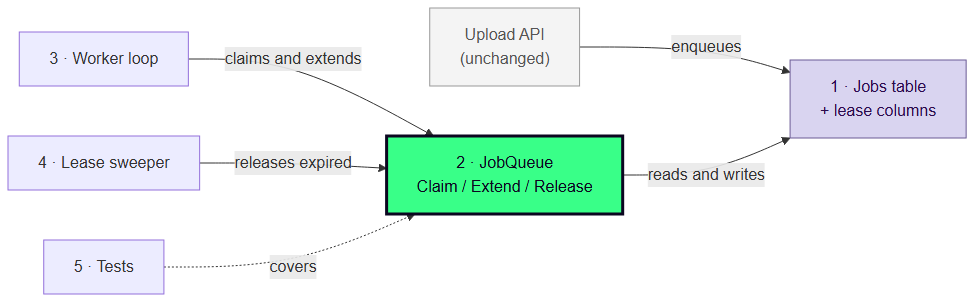
For a change with several moving parts, it starts with a flow map: one box per chunk, with arrows for which part calls which. At each chunk it draws the map again with that chunk highlighted, like the "you are here" dot on a mall map. Here's a made-up example, partway through a change that adds leases to a job queue:
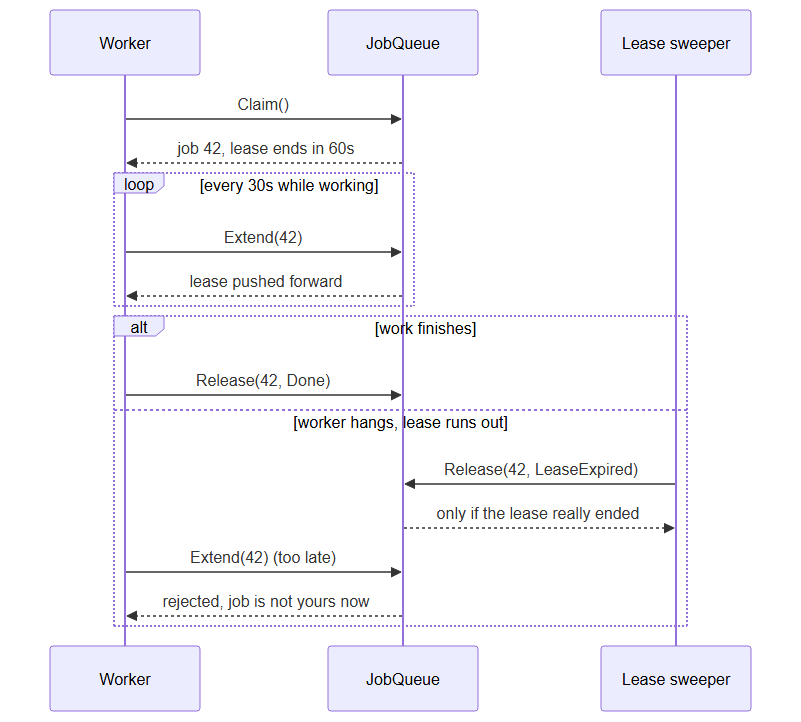
When a chunk has behavior a picture explains better than words, it draws that too. For the chunk above, that's a sequence diagram of a job's lease: claimed, kept alive, and then either finished or taken back after the worker goes quiet.
Other kinds it can reach for: a state diagram for a row that moves from Pending to Claimed to Released, a picture of who else calls a method that changed, a view of two things racing for the same row, or how a value gets built up step by step. It isn't limited to a list.
The part I care about most is that it decides, and it doesn't draw for fun. Before it draws one, it has to name the question the picture answers, like "what happens if the worker dies halfway?" If it can't, no picture. Most small chunks get none. If I want one it didn't draw, I just ask during the questions. It also only draws what it actually saw in the code, and it draws on my machine. It never uses Mermaid's public web service, since the diagrams carry names from our code.
Using it on other people's PRs
A few hours after I built it, I asked Claude:
can I use the walkthrough skill when doing PR reviews for others?
The answer was yes, sort of. It could read any PR, but two parts were built for my own work. The "why" sources were mine, and someone else's PR won't have my decision log. And the findings ended in "which ones should I fix?", which is the wrong question when the code isn't yours.
So now it checks who wrote the PR. For someone else's, it reads the PR description, the linked issue, and the existing review comments instead. For PRs on our main repo at work, it also checks each chunk against the checklist of mistakes our reviewers keep catching. If I say "fix that" partway through, it writes a review comment instead of touching code.
At the end it drafts the review: a comment for each finding I kept, pinned to its file and line, plus an overall summary and a suggested verdict. It never posts on its own. If I ask, it creates a pending review on GitHub, which only I can see, and I read it and hit submit myself.
The second agent I use to check the first one's work caught a few things here I wouldn't have thought of. GitHub only lets you have one pending review per PR at a time, so if I'd already started one in the browser, it has to add to mine instead of failing. A comment can only attach to a line that's actually in the diff. And without a rule, "fix that" on a coworker's PR would have edited my local copy of their code.
A transcript of the whole thing
Another change came from wanting to keep what we talked about. Every walkthrough now writes a file like PR812-WALKTHROUGH.md as it goes: the agenda, each chunk exactly as shown, every question I asked word for word with the answer, the diagrams, the findings, and what I decided. When I tear down the worktree, the transcript and its pictures get moved to a folder that gets backed up.
It writes each part before the turn ends, not at the end. Long sessions get compacted, which means older parts of the conversation get summarized and the original wording is gone. I'd rather hand off than compact, but the file covers me either way. It also blanks out anything that looks like a password in a copied diff.
When it's done, it offers a quick quiz on the trickiest part, and I can say no. The quiz goes in the file too.
Most of this happened in one day: built after lunch, citing its sources by dinner, and ready for coworkers' code that evening. The diff tabs and the diagrams came the next morning. I haven't used the coworker part on a real PR yet. My next review is the test, and I'll walk you through how it goes.
Drafted with an assistant, edited by @wintaru
0 comments