Build your own agentic layer, part 3: tools, MCP, and a tiny RAG

@wintaru · Oct 8, 2026 · 6 min read
Part 3 of a series on building your own agentic layer. Part 2 covers rules, skills, and the context window.
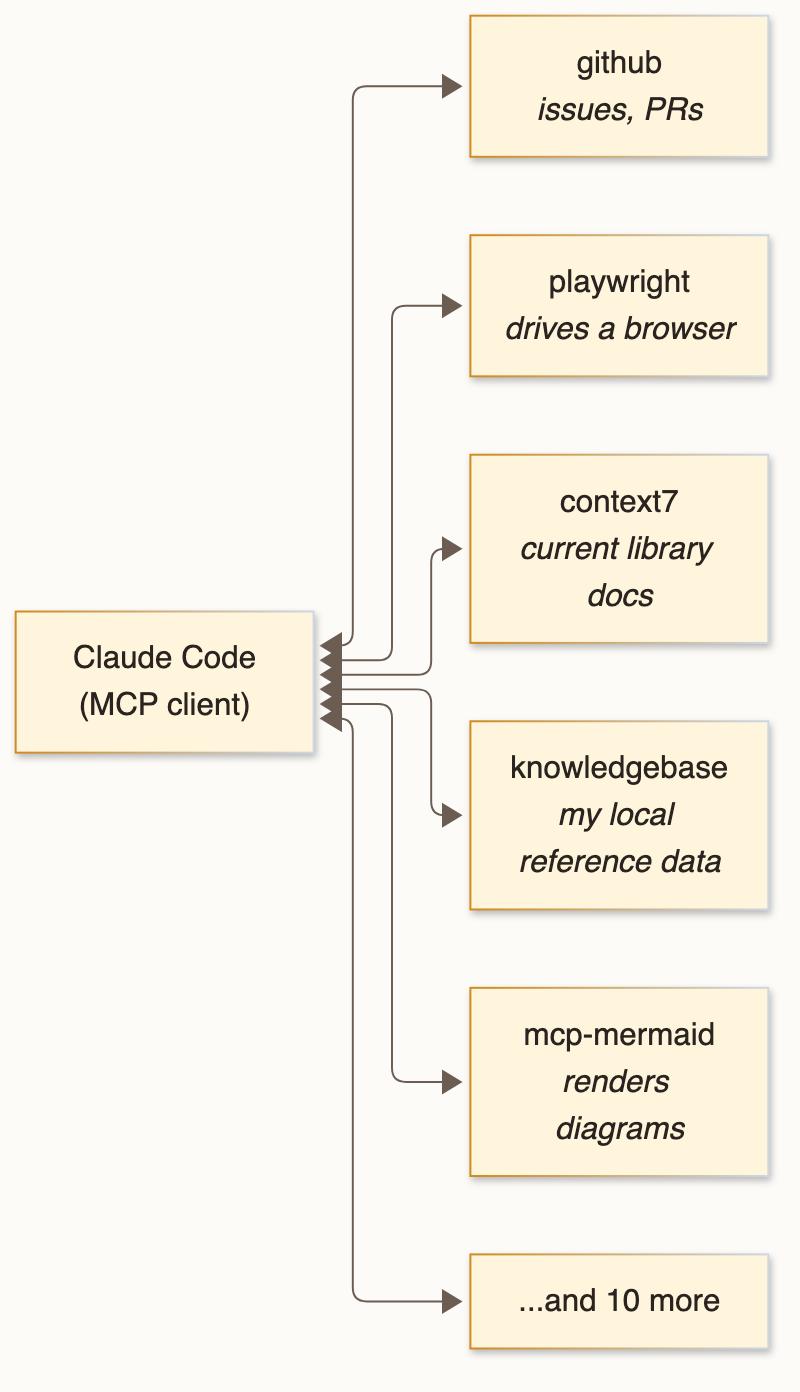
Rules tell the agent how to behave. Tools let it do new things. Out of the box Claude Code can read and edit files, run shell commands, and search the web. Everything past that, I add with MCP.
What MCP is
MCP (Model Context Protocol) is a standard way to plug a tool into an agent. An MCP server is a small program that says "here are the tools I offer, here's what each one takes as input," and the agent (the MCP client) can call them. The model never runs the tool itself. It asks the harness to call it, and the result comes back into the context window.
The nice part is that it's a standard. The same GitHub MCP server works in Claude Code, Cursor, and a pile of other tools, and you don't write any glue.
Trillian's installer registers its MCP servers at user scope, which means they're on in every project on that machine. If a server needs a token that isn't on the machine, the installer just skips it, so one script works everywhere.
The ones I'd start with
- Playwright drives a real browser. The agent can open my app, click around, and take screenshots to check its own work. This is my most-used server by a mile, about 1,900 calls so far.
- GitHub reads issues and pull requests. When I say "look at the issue for this", Claude takes the issue number from the branch name and reads the issue and its comments.
- Context7 pulls current docs for a library. Models are trained on a snapshot, so they'll confidently use an API that changed last year. This fixes a lot of that.
- Serena gives the agent "go to definition" and "find references", like an IDE. It can read one function instead of a whole file.
I also have servers for Azure, AWS, Supabase, SQL Server, Semgrep (security scanning), Mermaid diagrams, Xcode, and Apple's docs. Some of those barely get used. That's what the last post in this series is about.
RAG, in plain terms
RAG stands for retrieval-augmented generation. The idea is simple. Before the model answers, you retrieve relevant text from somewhere and put it in the context window. Then the model generates its answer from that text instead of from memory.
It matters because a model's memory is fuzzy and out of date, and it'll make things up rather than say "I don't know". Text sitting right there in the context is much harder to get wrong. When people say a chatbot is "grounded in your documents", RAG is usually how.
Context7 is a kind of RAG for library docs. I also built one for something more personal.
A tiny RAG of my own
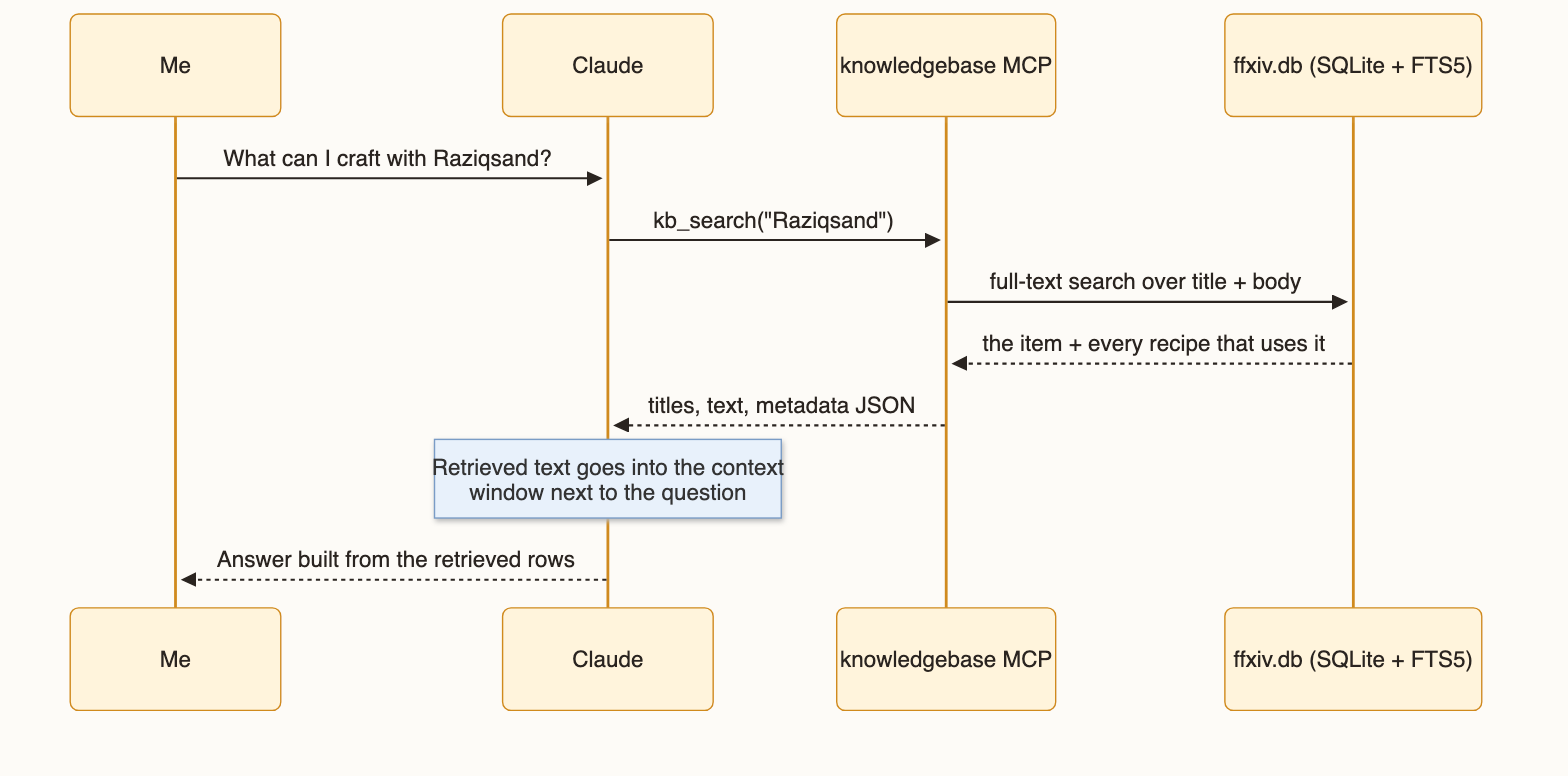
I play Final Fantasy XIV, and I kept asking Claude game questions that made it scrape the same wiki pages over and over. So Trillian has a knowledgebase MCP server. It's small: one SQLite file per knowledgebase, one documents table (id, title, body, url, type, and a JSON metadata column), and three tools:
kb_listshows which knowledgebases existkb_searchsearches onekb_getfetches a single document
There are three FFXIV knowledgebases right now. One is about 97,000 documents of structured game data from XIVAPI (items, recipes, quests, gathering nodes from Teamcraft). One is about 85,000 pages from the Console Games Wiki. The last is a set of controller hotbar layouts for all 33 jobs, by a community creator named Nanaki.
So when I ask "what can I craft with Raziqsand?", it doesn't go to the web. It searches the local database, gets back the item and every recipe that uses it, and answers from those rows.
Adding a new knowledgebase is a short ingest script and one entry in a registry.json. The server code doesn't change.
Keyword search vs. embeddings
When most people say RAG they mean vector search. You run every chunk of text through an embedding model, which turns it into a long list of numbers (a vector) that captures what it means. Text with similar meaning ends up with similar numbers. You store those in a vector database, and at question time you embed the question and find the closest chunks. That's how a search for "car" can find a document that only says "automobile".
I didn't do that. My knowledgebase uses SQLite's built-in full-text search, FTS5, which is plain keyword search with good ranking (BM25, the standard ranking formula behind a lot of classic search engines).
For this data, keywords are the right call. Item names, quest names, and job names are exact strings. Nobody asks for "the shiny reagent that hardens gold". It also means no embedding model, no vector database, no API key, and the whole thing is one file. Since the agent writes the search query itself, it can just try a different word if the first search misses.
If your data is fuzzy prose, like meeting notes or support tickets, that's when embeddings start paying for themselves.
A few lessons
- Prefer structured sources over scraping. Most of the data comes from APIs (even the wiki one uses the wiki's own API), not scraped HTML, so it doesn't break when a page template changes. The hotbar layouts had no API, so they're a one-time snapshot.
- Keep tool output small. Everything a tool returns lands in the context window. A search that returns 200 full pages is worse than one that returns a few titles and lets the agent ask for the one it wants. That's why
kb_searchonly returns a title and a short snippet per hit, andkb_getfetches the full document. - Big data files need a plan. The three databases are about 143 MB, so they're in git through Git LFS, and the installer pulls them down.
Links
- Model Context Protocol
- Connecting MCP servers to Claude Code
- The original RAG paper (Lewis et al., 2020)
- A plain overview of RAG from the Prompt Engineering Guide
- SQLite FTS5
- Playwright MCP, GitHub MCP, Context7, Serena
Drafted with an assistant, edited by @wintaru
0 comments