Build your own agentic layer, part 6: running a lot of agents at once

@wintaru · Oct 8, 2026 · 5 min read
Part 6 of a series on building your own agentic layer. Part 5 covers subagents and code review.
Once agents can run without you watching, you'll run more than one. When I started writing this post there were eleven other Claude sessions open on my laptop: most of them on one project, one on our family wall calendar, and a couple on Trillian itself.
Each session is its own process. They can't talk to each other, and none of them knows the others exist. But they all share one machine, and some things on a machine there's only one of.
What collides
- Ports. Two sessions both start a dev server on port 3000. The second one fails, or worse, quietly connects to the first one's server and tests the wrong code.
- The local database. I use Supabase for a few projects, and its local stack is a set of Docker containers on fixed ports. Two sessions running
supabase startfight over them. - The git checkout. Two sessions editing the same folder on different branches will trip over each other's files.
A registry so sessions can see each other
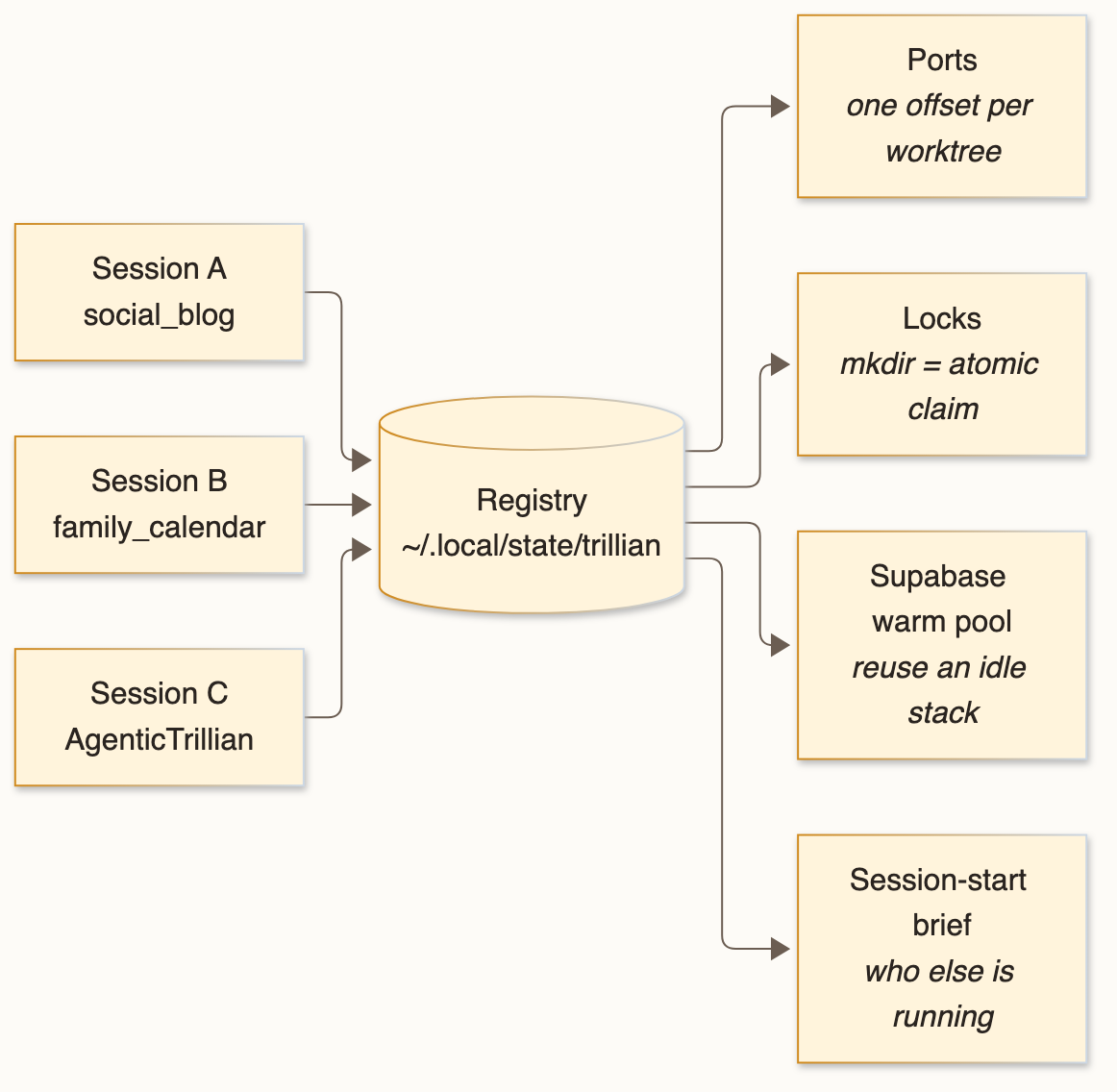
Trillian has a small command-line tool, trillian-resource, that keeps a registry in a folder under ~/.local/state/trillian/. Every session registers itself when it starts and drops a heartbeat as it works. A hook updates each session's status line from what it's doing, so the list reads like a team stand-up:
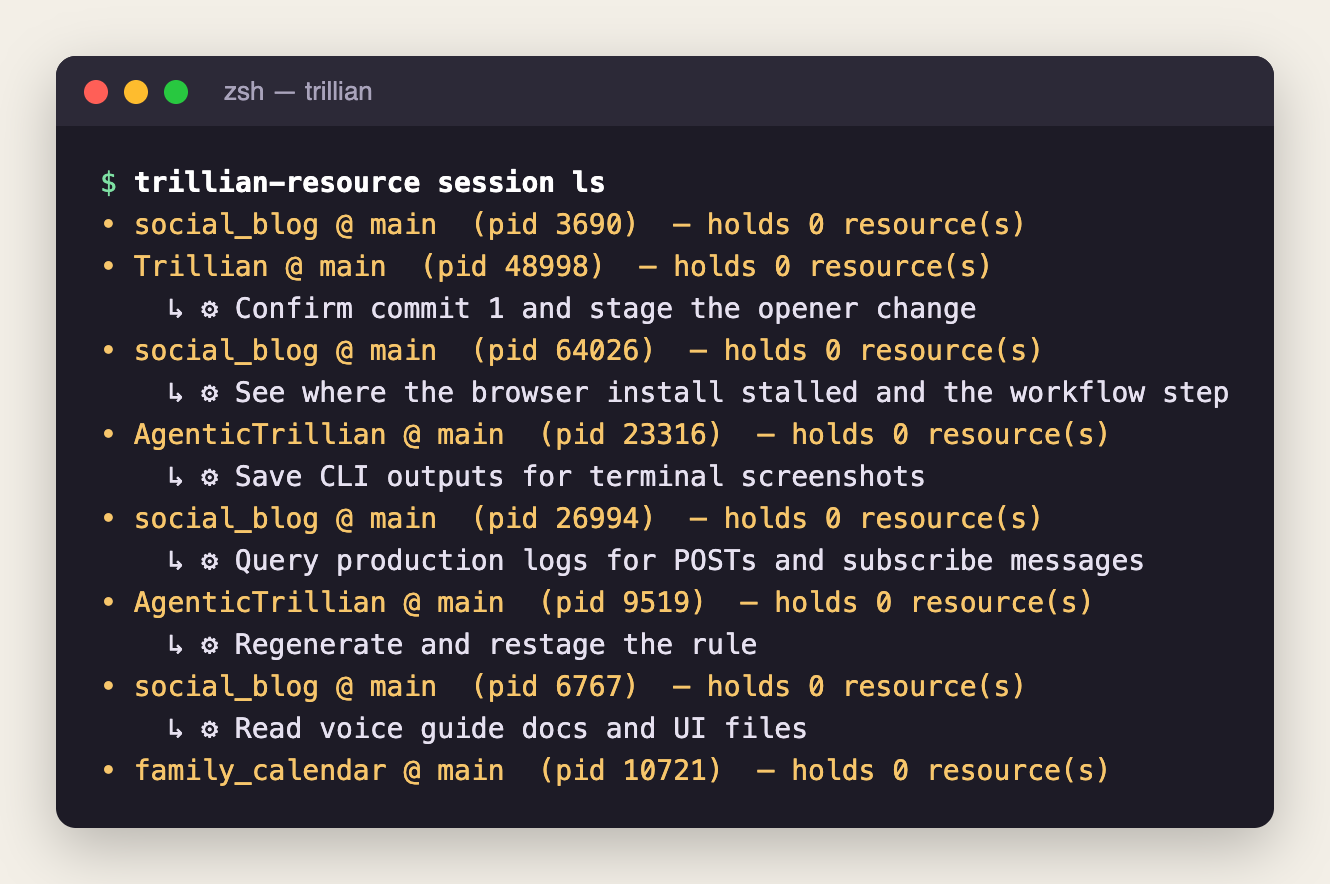
At the start of every session, the brief tells Claude which other sessions are live and what they hold. So it knows not to grab port 3040, because another session already holds it.
Three tricks make it work without a server or a database:
Ports by worktree. trillian-resource port 3000 turns the folder path into a fixed offset, so the same checkout always gets the same port. Then it checks the port is actually free before handing it out.
Locks with mkdir. For something only one session can hold, like a database, the lock is a folder. Creating a folder with mkdir is atomic: the operating system either creates it or reports that it already exists, in one step, so two processes can never both succeed. The folder holds the owner's process ID. If a session crashes and leaves a lock behind, the next one runs kill -0 <pid>, which sends no signal at all but tells you whether that process still exists. Dead owner, stale lock, take it.
A warm pool for Supabase. trillian-resource supabase acquire reuses an idle local stack if there is one, or starts a fresh one on its own block of ports. If the stack's schema doesn't match your project's migrations, it loads them in.
And a hook, resource-guard.sh, denies the two collisions it can spot for sure: starting Supabase while another session holds a stack, and binding a port another session has claimed. The deny message points Claude at trillian-resource instead.
Worktrees for real parallel work
A git worktree is a second checkout of the same repo in another folder, on its own branch, sharing one .git history. It's how two sessions can work on one repo without stepping on each other's files.
Trillian has /worktree and /worktree-clean commands for this. Making a worktree turned out to have a long tail:
git worktree addonly copies tracked files. Anything gitignored stays behind:.envfiles, Trillian's per-repo settings, and the editor's run configurations. That last one cost the most. Without it the new checkout opens with no way to start the app, and you rebuild the launch profile by hand every time./worktreecopies them across and rewrites any paths that pointed at the old folder.- New branches got cut from whatever was checked out locally, which was often stale. Now they're cut from the base branch fetched fresh, and a hook keeps that base branch fetched in the background.
- git's default setup made each new branch track the base branch, so every git GUI showed it as permanently "diverged". The fix is
--no-trackwhen cutting the branch. Worktrees made from an IDE's own menu don't know about that, so another hook quietly repairs their tracking. - When a worktree goes away, its decision log gets folded back into the main checkout first, so the reasoning doesn't vanish with the folder.
My rule is not to reach for a worktree by default, though. One line of work, one checkout. Worktrees are for when two sessions really are working on the same repo at the same time.
Dev servers
Agents love to start a dev server, test something, and leave it running. With several sessions, that turns into a pile of orphaned servers holding ports nobody can find.
The rules now: check whether a server is already up for this checkout before assuming the app is broken. Start servers as tracked background tasks that the session can stop, never with a bare & that leaves an invisible process behind. And stop what you started when you're done.
Know when one needs you
With this many sessions, I'm not watching any of them. Every session notifies me on my desktop and my phone when it finishes or gets stuck, and the notification says which project it's from. That setup is its own post: Claude, ping me.
Links
- git worktree
- Supabase local development
- Claude Code common workflows, including running parallel sessions with worktrees
- Claude, ping me
Drafted with an assistant, edited by @wintaru
0 comments