Build your own agentic layer, part 10: just say Trillian

@wintaru · Oct 8, 2026 · 7 min read
Part 10 of a series on building your own agentic layer. Part 9 covers measuring what gets used.
The last nine posts were about what Trillian does. This one is about why it's built the way it is, and it was one of my biggest reasons for building it in the first place.
I didn't want to have to remember everything it does. I wanted it to just do it.
There's a line near the top of the "automate by default" section in Trillian's rules that says it plainly:
I won't remember how this system works — so don't make me. Operate the machinery for me instead of explaining it.
Trillian has 35 skills, 15 commands, 24 hooks, and 15 MCP servers. I couldn't list them from memory, and I shouldn't have to. If using my own tool means memorizing its commands, I've built a second job for myself.
Just say "Trillian"
The simplest version of this is the name. In any Claude session, in any repo, on any machine, I can say "Trillian" and it knows what I mean:
- "Trillian, add this to my list" makes a task.
- "Trillian, what's on my list?" reads them back.
- "Trillian, new rule: ..." changes the config itself.
- "What can Trillian do?" lists everything it has right now.
No slash command to remember, no syntax. The slash commands exist (/trillian add ...), but I don't have to remember them.
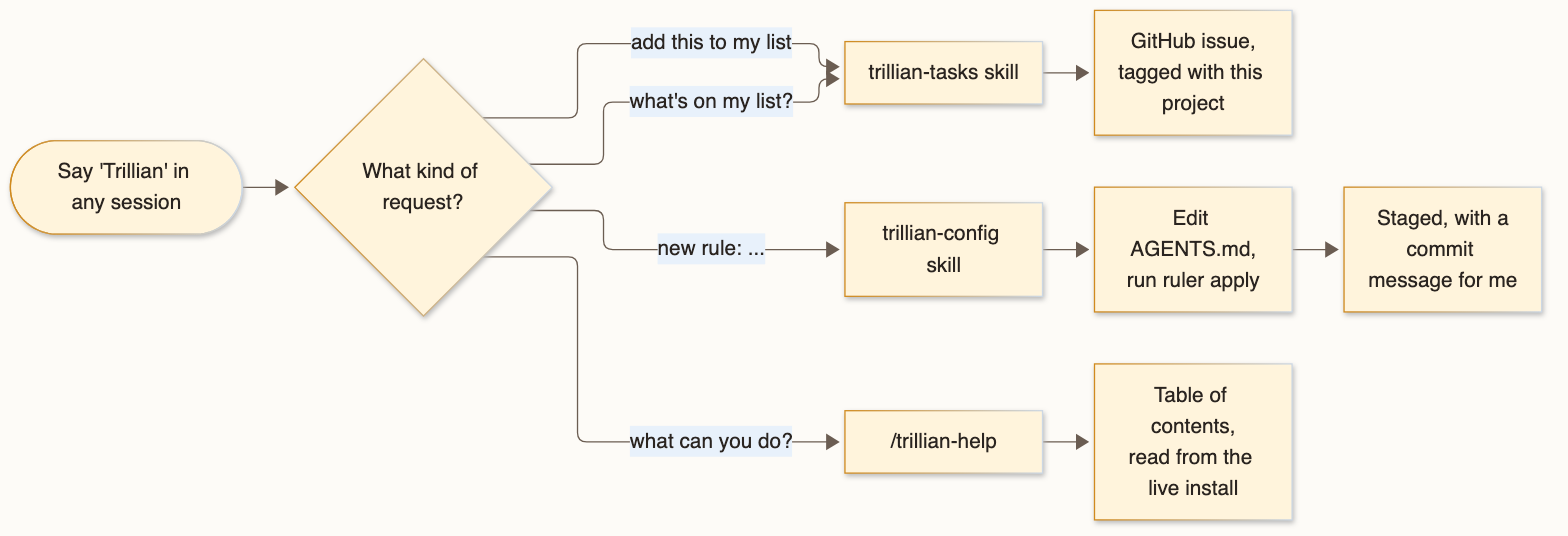
How it works is less magic than it sounds. It's two pieces from part 2:
- A skill description that names the trigger. The task skill's description starts with "TRIGGER on the word 'Trillian'" and lists the phrases I actually use: "add this to my tasks", "remind me to", "what's on my list". The description is the only thing the model sees when deciding whether to load a skill, so that's where the trigger goes.
- One line in the always-loaded rules. The rules say the word Trillian is a trigger, and that Trillian is live in every project and machine. It's not something the agent has to discover first.
The config skill works the same way with its own phrases ("add a rule to Trillian", "allow this command globally", "stop prompting me for X everywhere"). The model tells them apart by what I'm asking for: a to-do goes to the task list, a preference goes to the config.
Tasks live in GitHub
When I say "add this to my list", the agent creates a GitHub issue in the Trillian repo. It tags the issue with the project I'm in, taken from the git repo's folder name, so I never have to say which project. A recent one, from inside the Trillian repo: "Build a demo Contacts API", tagged project:AgenticTrillian. Others were a set of accessibility fixes for one app, one issue each.
Because it's GitHub, the same list shows up on every machine and in every session. The session-start brief (more on that below) shows the open ones for the project I'm in.
"New rule" edits the config, end to end
When I tell Claude "from now on, do X" in any project, it doesn't just remember it for this conversation. It treats it as a change to Trillian:
- It confirms the exact wording with me.
- It edits the rules file in the Trillian repo, wherever I happen to be working.
- It runs
ruler applyto regenerate the config. - It updates any docs that list what Trillian can do.
- It stages the change and hands me a commit message.
Then I commit, and every machine gets it on the next pull.
The rules say making the edit is pre-authorized. It confirms the wording, not whether to do it. And it can't be a note that lives only in chat or in one machine's memory, because then it's gone next session.
It doesn't wait for the magic word
The best version of this is when I don't say "Trillian" at all.
The rules tell the agent to watch for two things and bring them up on its own:
- A preference in passing. If I say something that sounds like a lasting preference, even softly ("I like X", "X is annoying"), it offers to make it a rule. A lot of rules got in through corrections like that. The code-comments rule is one: in September Claude added comments to two small changes that the commit message already explained, and now "default to no comments" is a rule everywhere.
- A stack Trillian doesn't support yet. If I start working in a language or framework with no skill, no formatter, and no permissions set up, it says so once and proposes the specific pieces that are missing. The Swift skill started this way, in the middle of an iOS project that had nothing backing it.
It asks once per stack per session, and "no" means leave it.
And for everything it misses in the moment, there's the preference-mining loop from part 7. It reads my past corrections and turns the repeated ones into proposed rules.
It tells me what it knows, so I don't have to ask
Every session starts with a short brief from a hook. It covers who else is running, what they hold, what state git is in, and anything that needs my attention. Here's the one from the session that wrote this series:
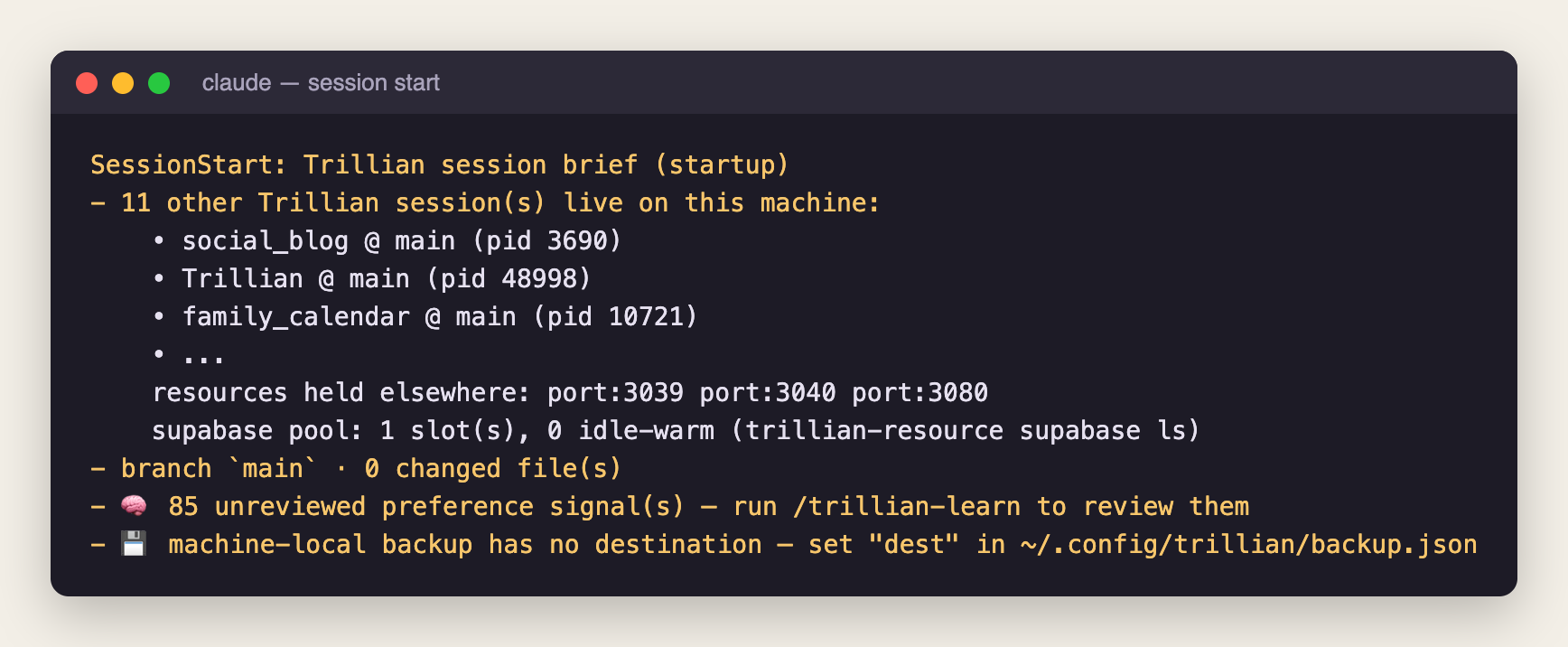
I didn't ask for any of that. It also flagged something: backups on this Mac have no destination set.
Every prompt also gets a one-line status, so I can see at a glance which modes are on:
Trillian status — modes: learning ON · receipts armed · gates: verify ✓ · review ✓ · branch ✓
And when I do want to see everything, "what can Trillian do?" runs /trillian-help. That command builds the list from the installed files every time. It's not a memorized list, so it can't go stale.
New repo, a few questions, then never again
Each repo gets a small settings file, .trillian-repo.json. It holds how to type-check, lint, and test, the dev server command, whether I want PRs, and which files are off limits. When a repo doesn't have one yet, a hook makes the first thing in the next session a short questionnaire.
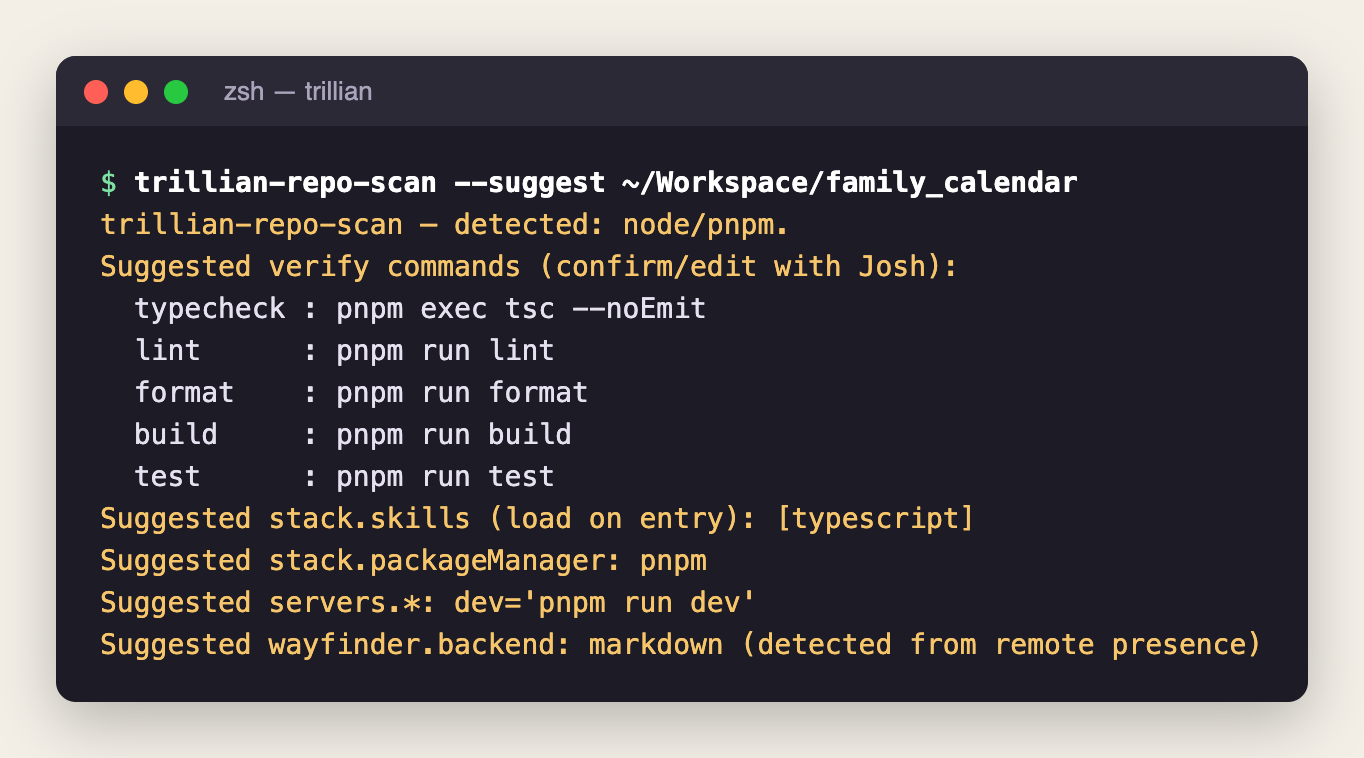
It doesn't ask me to remember the commands, though. It scans the repo first and pre-fills the answers:
So it's mostly confirming. From then on, every session in that repo knows how to verify its work without working it out again.
The rules that make this a habit
A few more lines from the same section of the rules. They do a lot of the work:
- Load skills proactively. If the work matches a skill, load it. Don't wait to be asked.
- Run procedures end to end. Don't stop at "here's what you could do." Do it, then tell me what changed and the one step left for me.
- Recommend, don't quiz. If you need a decision, give a recommendation and go with the obvious default. Don't ask me to recall how things work.
There's one balancing rule. If a task needs a tool that isn't installed, the agent shouldn't quietly work around it. It says what's missing, gives me the options, and recommends one. "Just do it" isn't the same as "hide things from me."
Where it stops
"It just does it" has a line, and the line is outward-facing or hard to undo. It never commits, never pushes, and never opens a pull request. It stages the work and hands me the message, and I do those myself. The hooks from part 4 still ask before anything risky.
Everything inside that line, I don't want to think about. That's the whole point.
Links
- Claude Code skills, and why the description is the trigger
- Claude Code hooks, for the session-start brief and per-prompt status
- Claude Code slash commands
- GitHub CLI: gh issue, which the task skill uses
- ruler
- Part 1 of this series
Drafted with an assistant, edited by @wintaru
0 comments