Build your own agentic layer, part 9: measure it, then delete it

@wintaru · Oct 8, 2026 · 5 min read
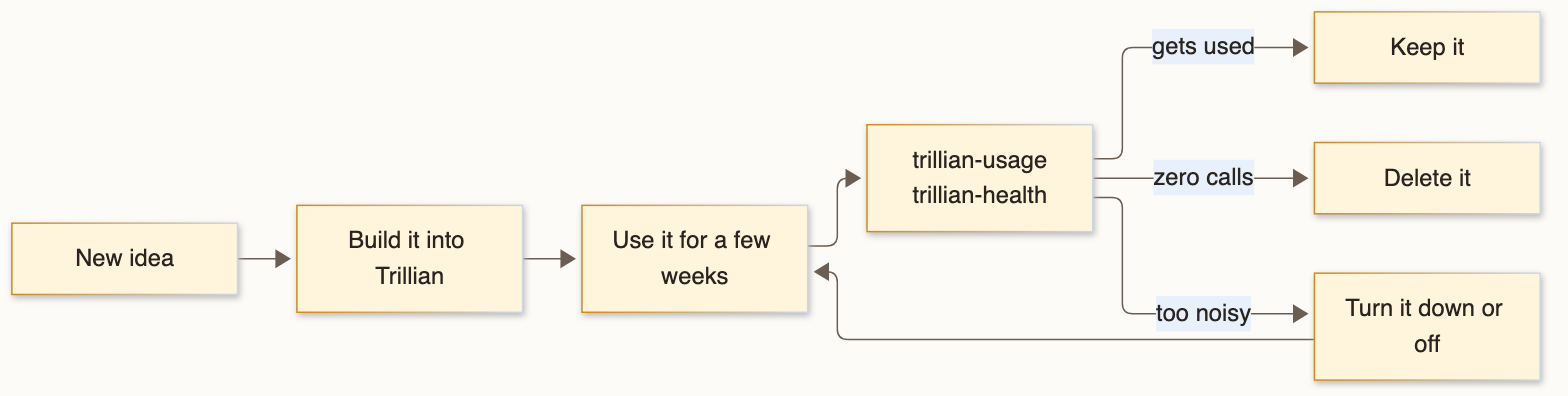
Part 9 of a series on building your own agentic layer. Part 8 covers keeping myself sharp while the agent does more.
Adding things to an agentic layer is cheap. But each one costs something on every session: tokens in the context window, a tool name the model has to consider, a hook that runs on every command. After three and a half months, Trillian also has tools whose job is to tell me what to delete.
Is the config telling the truth?
The first tool is trillian-health. It builds an inventory from the real sources (the skill folders, the hooks wired into settings.json, the MCP servers in the installer) and checks it against the docs.
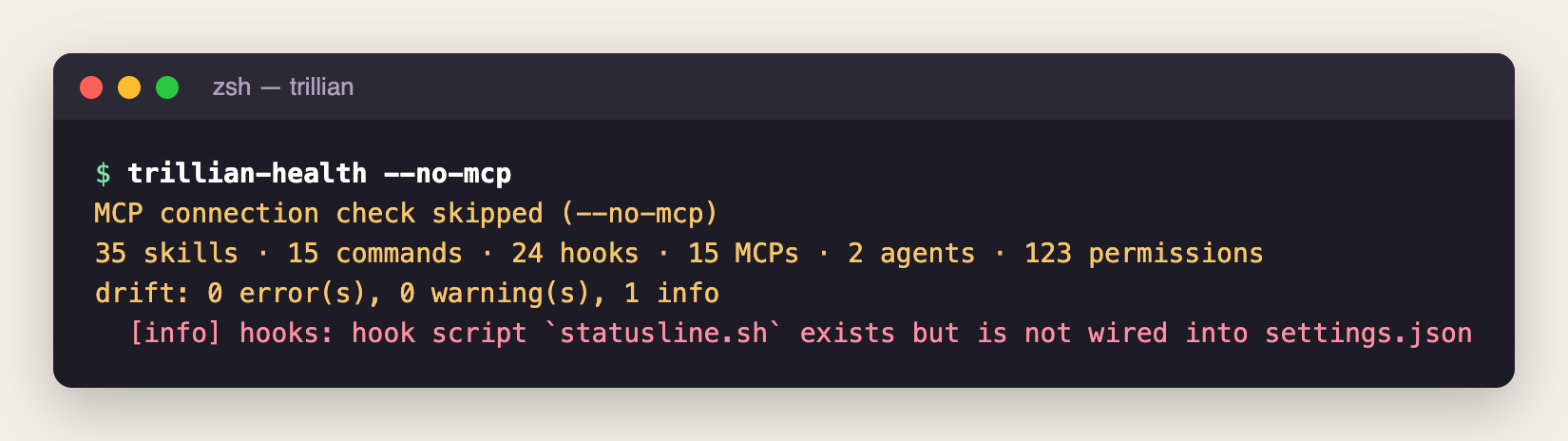
It flags things like a skill that isn't in the capabilities list, a hook that's wired up but whose script is missing, a script that exists but isn't wired to anything, or an MCP server that won't connect. Right now it has one note: my status line script isn't wired into settings on this machine.
This matters more with agents than with normal code, because the agent reads those docs. A doc that's out of step with the config can send it the wrong way. Trillian has a standing rule that any change to a skill, hook, command, or MCP server updates the docs in the same change, and trillian-health is how I check that it did.
Is anyone actually using it?
The second tool is trillian-usage. It reads every Claude Code transcript on the machine and counts which skills, MCP servers, and subagents actually got called. The hooks also log every command, permission stop, and gate block to a small file. It records names and counts only, never what I typed.
The bottom of the report is the useful part:
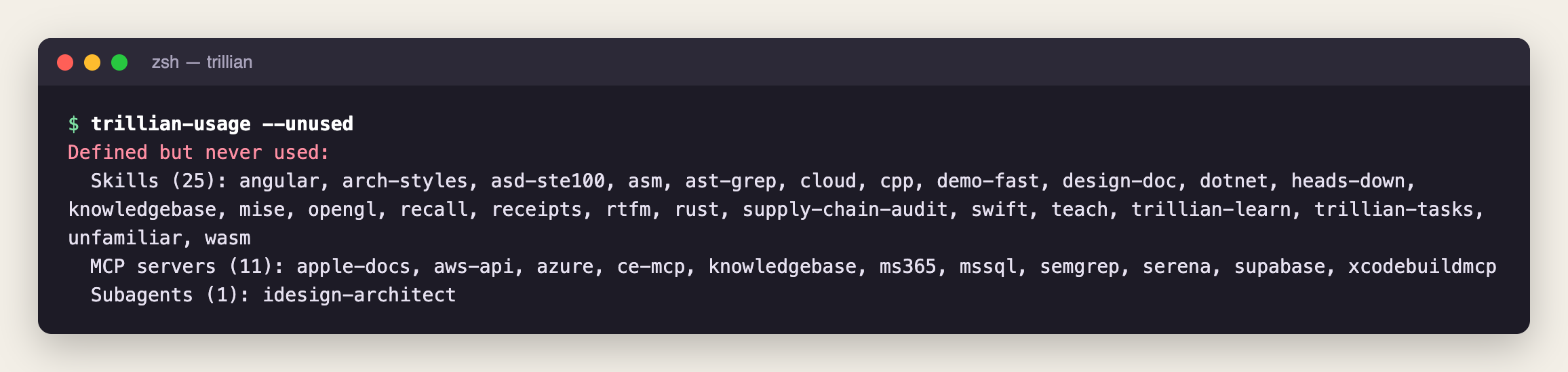
25 of 35 skills have never been loaded on this machine.
It needs reading with some care, though:
- Some of those are used, just not as skills. recall, rtfm, receipts, and unfamiliar are applied through the per-prompt reminder from part 8, so they never show up as a skill call.
- It's one machine. Transcripts are per machine, so a skill I use a lot on another computer can look unused here.
- Unused isn't always waste. A language skill only costs its one-line description until it loads. Keeping the Rust and assembly skills around is cheap insurance.
So it's a list of questions, not a list of deletions.
What I've deleted
Some of it went once the numbers were in.
A local LLM I never used. Early on I set up delegation to a model running on my own hardware, for "mechanical" work. The rules told Claude to reach for it reflexively, in about 700 words. trillian-usage showed zero calls out of 635 recorded tool uses. Three months of zero is an answer. I removed the server, its CLI, its command, and every reference.
The dashboard. Trillian had a web dashboard for a while: live sessions, held ports, usage charts, a repo settings editor, even a terminal version. Nothing on it was getting used, and a separate work dashboard of mine already covered what I needed. So the Trillian one went, and trillian-health is what's left of it, as plain text and JSON. Another tool I built, my work dashboard, reads Trillian only through --json output from its commands, so that JSON is the contract and nothing else has to stay stable.
Things that were too much. The review-before-commit gate from part 4, now off by default. The personality voice. A session-naming prompt that broke and came out the next day. An MCP server for NVIDIA's CUDA docs. A skill for one client's monthly report.
Delete outright
Where I can, I delete a feature outright instead of turning it off. The review gate is the exception: it's off but still wired up, in case I track down why it misfired. The commit that removed the personality feature says why deleting is the default:
Remove it outright rather than defaulting it off: git history is the reversibility mechanism here, and a dormant feature still costs a skill file, a tracked default, six test assertions and four doc entries to keep honest.
A feature that's switched off still has to be kept working, kept documented, and kept in step with everything around it. Git already remembers it. That's enough.
Keep it working everywhere
Two smaller habits that keep the whole thing healthy:
- CI on the config repo. Since day two there's been a GitHub Actions workflow that validates the repo, so a broken config fails there before it reaches a machine.
- Self-healing links. One script,
trillian-link, does all the symlinking, and both the installer and the session-start hook call it. When I add a hook to the repo, the next session on every machine wires it up on its own. Before that, a new hook could sit unlinked on a machine until the installer ran again. That once left the hook that publishes each session's status dead, so no session showed what it was doing.
Links
- Claude Code settings, where hooks and permissions get wired
- Claude Code hooks
- Effective context engineering for AI agents, on why everything you load has a cost
- Part 1 of this series, if you landed here first
Drafted with an assistant, edited by @wintaru
0 comments