Build your own agentic layer, part 1: what Trillian is

@wintaru · Oct 7, 2026 · 6 min read
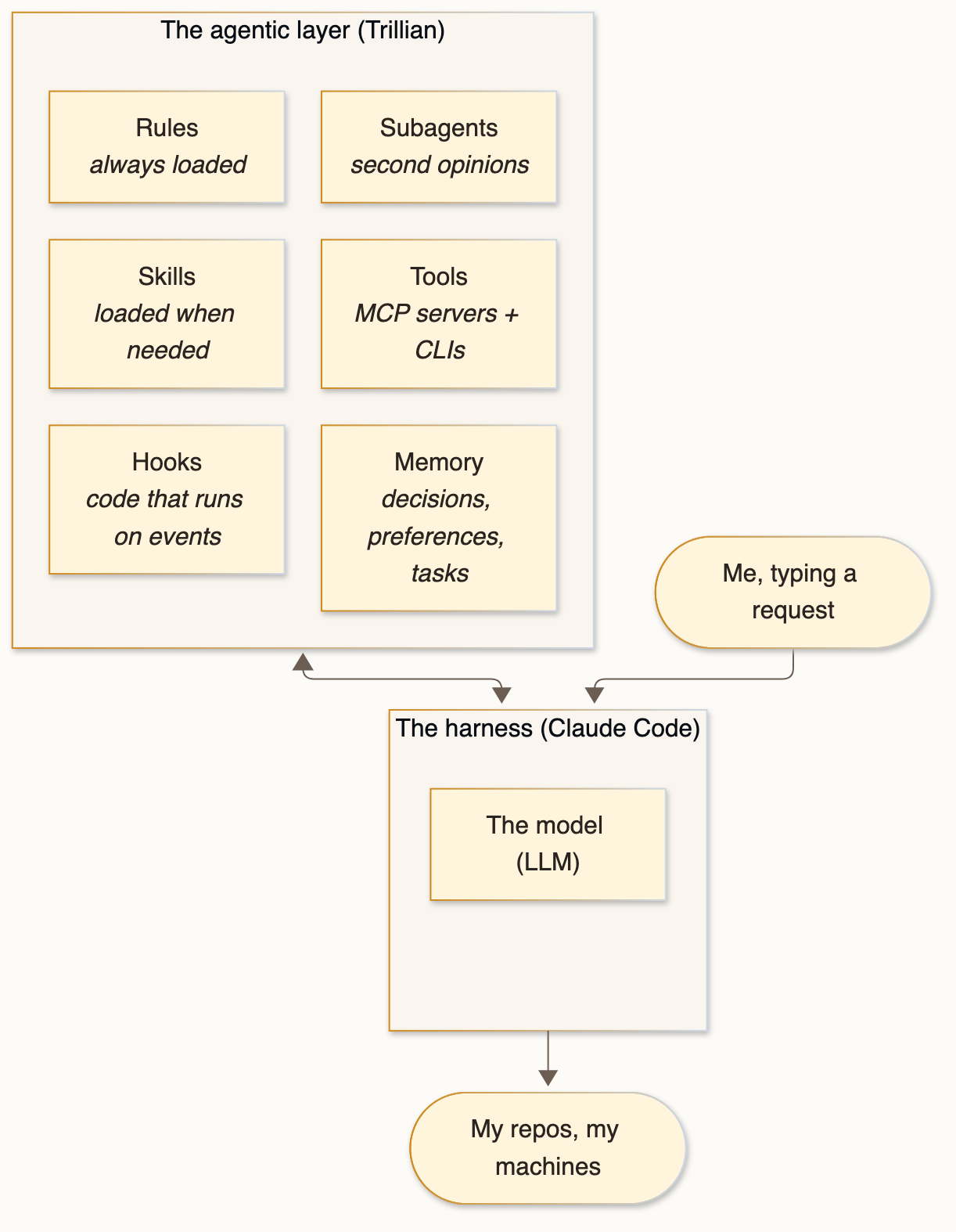
Part 1 of a series on building your own agentic layer.
Since June I've been building something I call Trillian. It's one git repo that holds every rule, tool, and guardrail I want my AI coding agent to have, on every machine I use. Clone it, run install.sh (or install.ps1 on Windows), and every Claude Code session on that machine works the way I want.
It started as a small config folder on June 19th. It's now about 240 commits, 35 skills, 15 slash commands, 24 hooks, and 15 MCP servers. I've also deleted a fair amount of it, which turned out to be just as important as adding to it.
This series is about how to build one of these yourself. I'll use Trillian as the example, but the ideas aren't tied to my setup.
Why Trillian?
I'm a terrible user. I hate reading manuals and learning how software should be used, I just want to get in and use it. Trillian is a key word. Once Claude sees that word it knows to load the Trillian skill and make changes. Most of the behavior here is on by default but if I want to change something, all I have to do is say "Hey Trillian, do xyz" and Claude knows what I want done.
Some words first
There's a lot of jargon in this space, so here's what I mean by the words I'll keep using.
LLM (large language model). The model itself: Claude, GPT, Gemini. Text goes in, text comes out. On its own it can't read your files or run anything.
Agent. An LLM in a loop with tools. It reads your request, picks a tool (read a file, run a command, search the web), looks at the result, and decides what to do next. It keeps going until the job is done or it needs you.
Harness. The program that runs that loop. For me that's Claude Code. The harness decides which tools exist, what goes into the model's prompt, and when to ask you for permission.
Context window. Everything the model can "see" at once: its instructions, your conversation, file contents, tool results. It's measured in tokens, which are chunks of text a bit smaller than a word. It's big but not unlimited, and everything in it costs money and attention.
System prompt. The instructions the harness puts in front of every conversation. Files like CLAUDE.md or AGENTS.md get added to it, which is how you give an agent standing rules.
Agentic layer. This is my term for everything you add on top of the harness so the agent works your way. Rules, extra tools, scripts that fire on events, helper agents, and memory. The harness is the car. The agentic layer is how you've set up the seat, the mirrors, and the radio presets, plus the lane-keep assist that stops you drifting into a ditch.
Why bother
Out of the box, an agent is a smart new hire on their first day, every day. It doesn't know I want small commits. It doesn't know I never want it to push to GitHub for me. It doesn't know which architecture style I use, or that it should never touch production. Without a layer, every one of those is a correction I make again in each new session.
Writing them down once was the start. I also wanted the same agent on my Mac, on Linux, and on Windows, so it became a repo.
The rest of the series
- Part 2: Rules and skills. What the agent always knows, and what it loads only when it needs it. This is mostly about keeping the context window small.
- Part 3: Tools (MCP). Giving the agent new abilities: GitHub, a browser, current library docs, and a small search engine over my own reference data. This is also where RAG comes in.
- Part 4: Hooks. Scripts that run on events, like "before any command runs". These are the rules the model can't forget, because they're code and not a suggestion.
- Part 5: Subagents. A second agent with a fresh context that reviews the first one's work.
- Part 6: Running a lot of agents at once. What breaks when a pile of sessions share one laptop, and how they coordinate.
- Part 7: Memory and learning. Decision logs, hand-off files, and a loop that mines my past corrections into proposed rules.
- Part 8: Keeping myself sharp while the agent does more of the work.
- Part 9: Measuring what gets used, so I can delete the rest.
How it's put together
The whole thing is a git repo. The rules are written once in an AGENTS.md file, which is an open format a lot of agents read. A tool called ruler turns that one file into whatever each agent expects (CLAUDE.md for Claude Code, and others for Cursor, Codex, or Copilot if I turn them on).
Everything else lives in a claude/ folder: skills, hooks, slash commands, subagents, and settings.json. The installer symlinks that folder into ~/.claude, so when I edit a file in the repo, it changes the live behavior right away. No copy step. Getting a change onto another machine is git pull && ./install.sh.
Secrets stay out of the repo, in ~/.config/trillian/env. The first run asks how Claude should address you, so someone else could clone it and not get called Josh.
It has to run on macOS, Linux, and Windows. The hooks are bash scripts, and on Windows Claude Code runs them through Git Bash, so there's one version of each and not a PowerShell copy to keep in sync.
If you want to start your own
The first day of Trillian was four things, and I'd still start there:
- A git repo with one rules file in it, symlinked to where your agent reads it (
~/.claude/CLAUDE.mdfor Claude Code). - The corrections you keep typing, written down as rules. Mine were "stage, don't commit", "no attribution lines", and "small commits".
- One skill for the thing you do the most. Mine was my architecture style.
- One or two MCP servers you'd use every day.
Most of what's in the rest of this series got added because something went wrong or got annoying. That's a good way to grow one. Don't build the guardrail until you've needed it.
Links
- Claude Code overview
- How Claude Code reads CLAUDE.md
- AGENTS.md, the shared rules format
- ruler, one rules file for many agents
- Building effective agents, Anthropic's write-up on agent patterns
- Claude Code best practices
Drafted with an assistant, edited by @wintaru
0 comments